
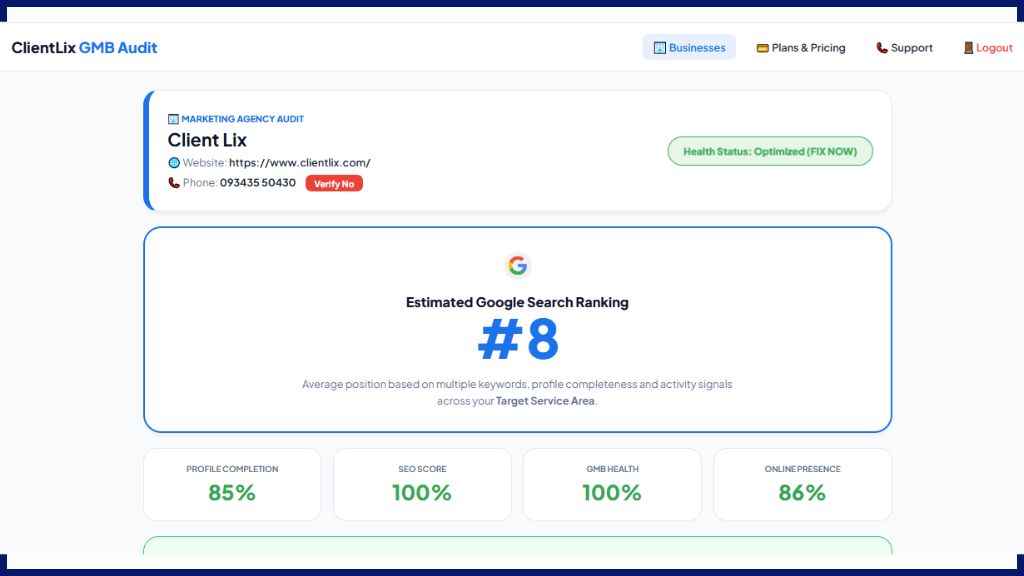
One of the most frustrating experiences for a local business owner is having a beautiful profile but no phone number. You check your dashboard, and it says “Pending” or “Under Review” for weeks. In some cases, the number simply disappears, leaving your customers with no way to contact you.
In India, Google has become extremely strict with phone number verification to fight spam and fake listings. But without a live number, your GMB ranking tool score will stay low, and you’ll lose valuable leads.
In this guide, we will explain why Google hides numbers and how our online GMB audit tool helps you make your phone number live.
Why is Google So Strict About Phone Numbers?
Google’s main priority is user trust. In the past, many “spam” businesses used fake numbers to redirect calls to call centers. To stop this, Google’s AI now scrutinizes every digit.
Common reasons for a hidden number include:
-
Mismatched Data: Your number on GMB doesn’t match the number on your website or Facebook page.
-
Regional Restrictions: In specific regions like India, Google often requires additional proof to verify a mobile number.
-
Technical Glitches: Sometimes, the “Review” process gets stuck in an infinite loop.
-
Lack of Trust Signals: If your GMB health score is low, Google is less likely to trust your contact information.
How Our Online GMB Audit Tool Solves the “Number Not Live” Issue
Most people don’t even realize their number is hidden until they stop getting calls. Our online tool provides a direct solution through the “Audit Dashboard.”
1. Instant Visibility Check
The moment you run a GMB audit for Local SEO, our tool checks your live status. If your number is not visible to the public, the tool flags it with a “Verify No” alert.
2. The “Verify No” Feature
Unlike other platforms, we don’t just tell you there’s a problem. Our dashboard has a dedicated “Verify No” button. When you click this:
-
Our AI analyzes your citation consistency.
-
It checks if your number is indexed correctly on your website’s Local Schema Markup.
-
It provides a guided path to get that number approved by Google’s manual or automated systems.
3. AI + Manual Support for Verification
Sometimes, AI isn’t enough to fight Google’s strict filters. If your number is stuck, you can talk to a GMB Expert via our tool. Our team understands the manual verification process and helps you submit the right documentation to Google to get your number live.
The Importance of a Live Number for Your SEO Score
In your GMB audit report, you will notice that your SEO Score and GMB Health are directly linked to your contact info.
-
Trust Factor: A verified phone number is a huge “Trust Signal” for Google.
-
Conversion Rate: Profiles with a “Call” button get 3x more engagement. Higher engagement leads to a better rank in our GMB ranking tool.
-
NAP Consistency: The tool ensures your number is the same across all platforms, which is the foundation of GMB optimization.
Why Use an Online Tool Instead of Doing it Manually?
Trying to fix a “Pending” number manually can take months of back-and-forth emails with support. Using an online GMB audit tool is better because:
-
Speed: It identifies the exact reason for the block (e.g., a citation error) in seconds.
-
No Downloads: You don’t need a heavy app; manage everything from your browser.
-
Live Recalculation: Once you update your info, you can “Recalculate Live Score” to see if the ranking impact is positive.
5 Steps to Ensure Your Number Stays Live
-
Use a Local Number: Try to use a number with a local area code or a standard Indian mobile number that is already linked to your official documents.
-
Match Your Website: Ensure the number in your website’s footer is identical to your GMB number.
-
Avoid Frequent Changes: Changing your number too often triggers Google’s “fraud” filters.
-
Audit Your Citations: Use our best local SEO tool to find old, incorrect numbers on the web and fix them.
-
Monitor Health: Keep an eye on your GMB Health score (aim for above 80%) to ensure Google keeps your contact info visible.
FAQ: GMB Phone Number Verification
1. Why is my phone number still “under review” after 3 days?
Google often takes up to 7 days for a manual review in India. If it takes longer, our online GMB audit tool can help identify if there is a technical block.
2. Can I use the “Verify No” button for any business?
Yes, this feature is designed to help any business owner whose number is hidden, pending, or rejected by Google.
3. Is there a GMB rank checker free that shows number status?
Our GMB ranking tool includes a health check that specifically looks for phone number visibility as a part of your overall ranking score.
4. Do I need to pay an agency to fix my number?
No. You can start by using our Google My Business optimization tool to see the “Optimization Checklist.” Many times, fixing a simple citation error will make the number go live.
5. What if Google rejects my number even after I fix it?
In “Critical” cases, our Manual Support experts can step in to help you navigate Google’s support tickets and get your business verified.
6. Is this tool available as a download?
No. This is a 100% online tool. You can access the “Verify No” feature and your GMB audit report from any laptop or mobile browser.
Conclusion: Get Your Business Talking Again
A Google Business Profile without a phone number is like a shop with a locked door. Don’t let Google’s strictness stop you from getting customers.
Use our free online GMB audit tool today to check your number’s status. If it’s not live, use our “Verify No” feature and expert support to fix it. Get your instant GMB audit report and make sure your customers can reach you with just one click!